
.webp?sv=2026-02-06&spr=https&st=2026-11-05T23%3A32%3A20Z&se=2026-11-07T11%3A32%3A20Z&sr=c&sp=r&sig=wzjA94fsgh4TpHjLWSVF%2BJSKufa8R7rcLhgxBadr%2BO4%3D)
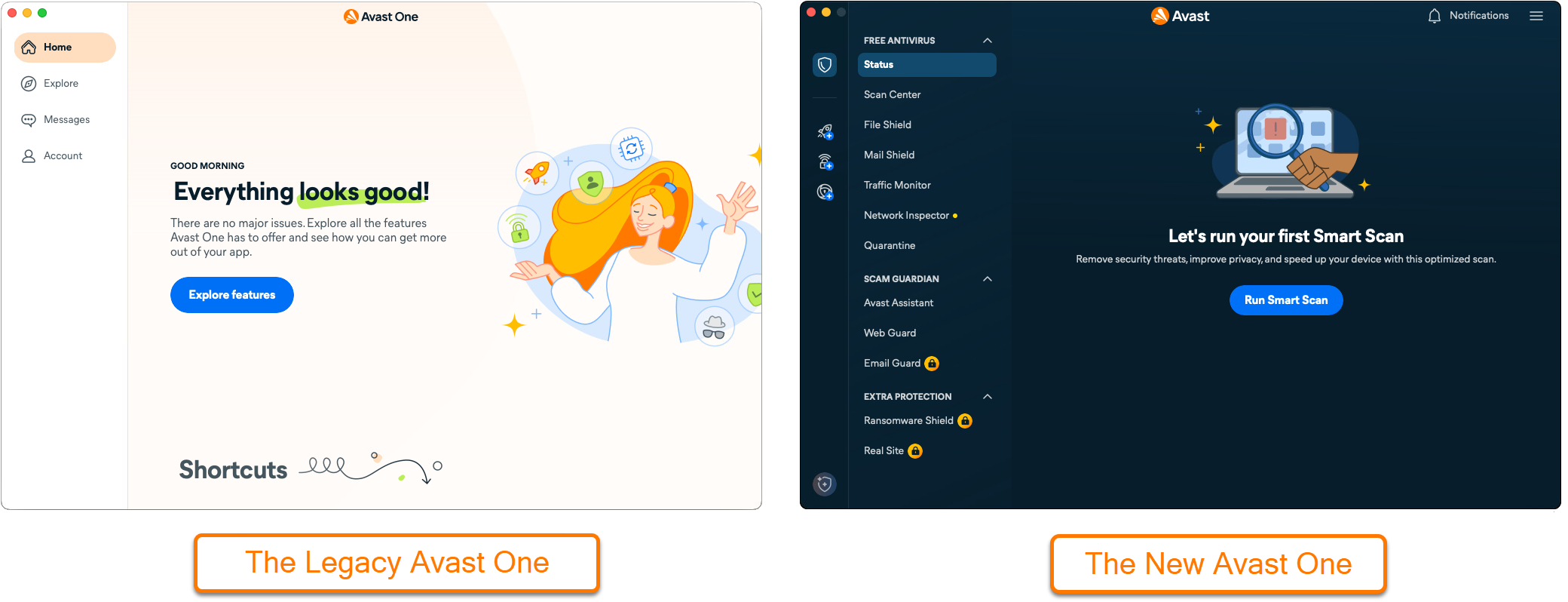
This article is about the new version of Avast One. For information about the old Avast One, refer to the following article: Avast One - FAQs.
General
What is the Avast Free Antivirus component of Avast One?
Avast Free Antivirus is a default component of Avast One. It is a security application that helps protect your device from viruses, malware, phishing, and other threats.
Avast Free Antivirus includes the free features listed below.
Can I upgrade the Avast Free Antivirus to a paid subscription?
Yes. Avast Premium Security is the premium version of Avast Free Antivirus. It includes all of the free features that are included in Avast Free Antivirus, as well as the premium features listed below.
For detailed instructions on how to upgrade to Avast Premium Security, refer to the following article: Installing and activating Avast One apps.
Avast Free Antivirus Features
What is Scan Center?
Virus Scans include several comprehensive virus scans that help detect and fix malware-related issues on your device.
- Smart Scan: Performs a comprehensive scan that helps detect system issues, hidden viruses, and other advanced issues at the same time. For information about running a Smart Scan, refer to the following article: Run a Smart Scan in Avast One.
- Deep Scan: Performs an in-depth scan for malware, checking the storage drives and system memory.
- Targeted Scan: Performs a scan of the folders or drives that you specify.
- External Storage Scan: Performs a scan for malware of any USB, external drive, or other storage device connected to your Mac.
What is File Shield?
Scans programs and files saved on your Mac for malicious threats in real-time before allowing them to be opened, run, modified, or saved. If malware is detected, File Shield prevents the program or file from infecting your device.
What is Mail Shield?
Scans your incoming and outgoing email messages in real-time for malicious content such as viruses. Scanning applies only to messages sent or received using a mail management software (email clients, such as Apple Mail or Microsoft Outlook). If you access your web-based email account via an internet browser, your Mac is protected by other Avast shields.
What is Traffic Monitor?
Traffic Monitor checks if any apps are using too much data and slowing down your internet. You can also find out where your apps send data and check if any apps are connecting to servers in a specific location.
What is AI Agent Protection?
AI Agent Protection (Sage) is a real-time security layer that sits between your AI agent and your system. Before an action executes (running a command, downloading a file, writing to disk), AI Agent Protection checks it first and either allows it, blocks it, or asks you for input. It helps your agents work fast without letting threats slip through.
For more information about Quarantine, refer to the following article: AI Agent Protection - FAQs.
What is Network Inspector?
Network Inspector scans your network for vulnerabilities and identifies potential security issues that open the door to threats. This feature checks the status of your network, devices connected to the network, and router settings. Network Inspector helps you secure your network to prevent attackers from accessing it and misusing your personal data.
What is Quarantine?
Quarantine is an isolated space where you can store potentially dangerous files or send them to the Avast Threat Lab for analysis. Files in Quarantine cannot run or access your system and data, so any malicious code contained within a file is unable to harm your Mac.
What is Avast Assistant?
Avast Assistant is an AI-driven tool designed to analyze texts, emails, and links for signs of scams. Beyond detecting suspicious content, it serves as a cybersecurity resource, allowing users to ask questions on various topics related to online safety.
For more information Avast Assistant, refer to one of the following articles:
What is Web Guard?
Web Guard is one of the main features of Avast Free Antivirus, which scans internet activity in real-time to prevent malware, such as malicious scripts, from being downloaded.
For more information about Web Guard, refer to one of the following articles:
Avast Premium Security Features
What is Firewall?
Firewall monitors network traffic between your Mac and external sources to help protect against unauthorized communication and potential intrusions. It is designed to operate with minimal user intervention. To maintain protection, simply keep the Firewall enabled and indicate whether a network is trusted when prompted.
In addtion, Firewall controls when applications on your Mac can access the internet or other networks. When an app launches for the first time, Firewall automatically creates default rules to manage its network access. You can also manually configure how Firewall handles connection attempts for each app, giving you greater control over your network security.
What is Email Guard?
Email Guard scans incoming emails in your online email accounts. Email Guard labels received emails as either Avast: Safe, Avast: Unsafe ,or Avast: Scam for potentially malicious or phishing emails. The labels are added directly in your online email account, improving your safety when checking emails from any device or any browser.
For more information about Email Guard, refer to the following articles:
What is Ransomware Shield?
Ransomware Shield helps secure your personal photos, documents, and files from being modified, deleted, or encrypted by ransomware attacks. This feature scans for and helps secure folders that may contain personal data, and allows you to specify which other folders you want to protect from untrusted applications. Additionally, you can specify which applications are allowed to modify the files in your folders and which applications are always blocked.
What is Real Site?
Real Site helps secure you against DNS (Domain Name System) hijacking. Some malicious programs can stealthily redirect you from an authentic URL to an inauthentic one to acquire sensitive information such as usernames, passwords, and credit card details.
