This article is about activating the standalone version of Avast Cleanup. For information about activating Avast Cleanup in the new version of Avast One, refer to the following article: Installing and Activating Avast One apps.
Avast Cleanup Premium for Windows is a paid app that requires a subscription to use. After installing Avast Cleanup Premium, you may need to manually activate the app using a valid activation code or your Avast Account.
Your activation options:
Activation Code
Enter activation code
To activate Avast Cleanup Premium using an activation code:
- Locate your activation code. This is included in your order confirmation email. For detailed instructions, refer to the following article:
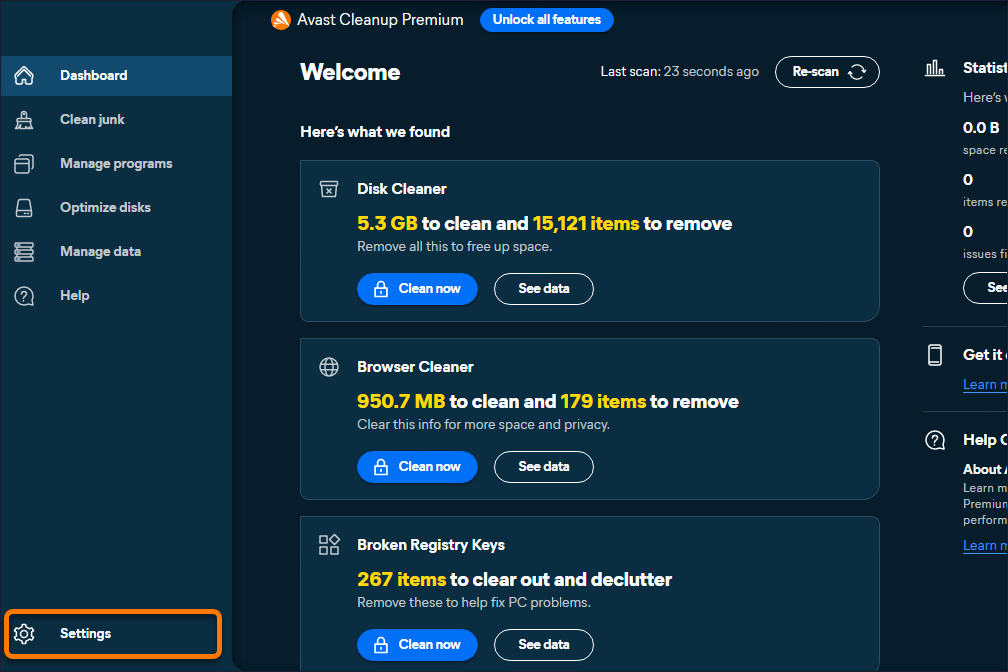
- Open Avast Cleanup Premium and hover your mouse over the side menu, then click Settings.
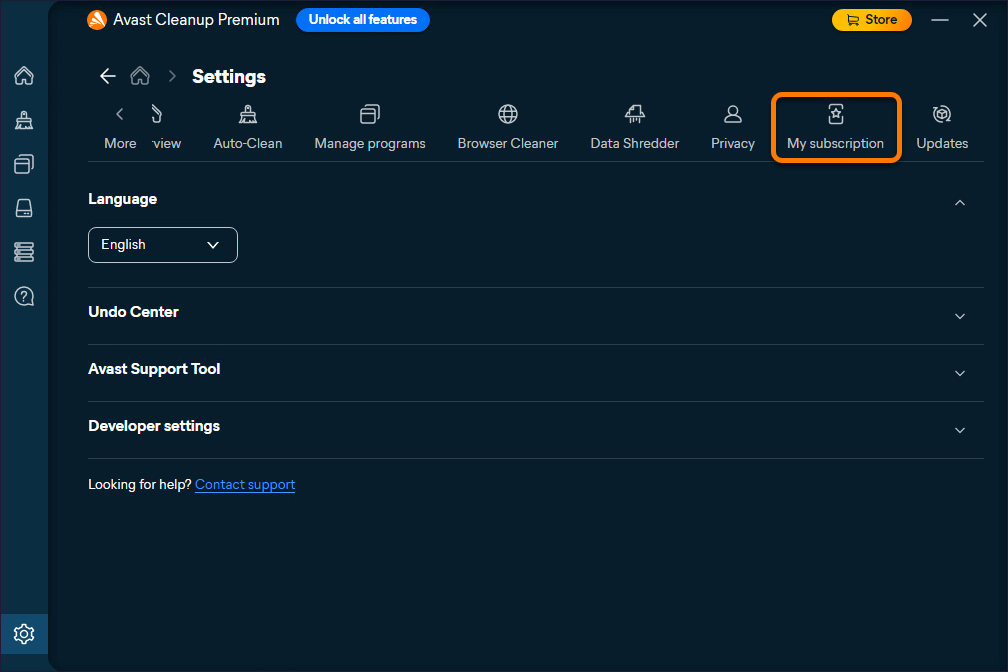
- Select the My subscription tab.
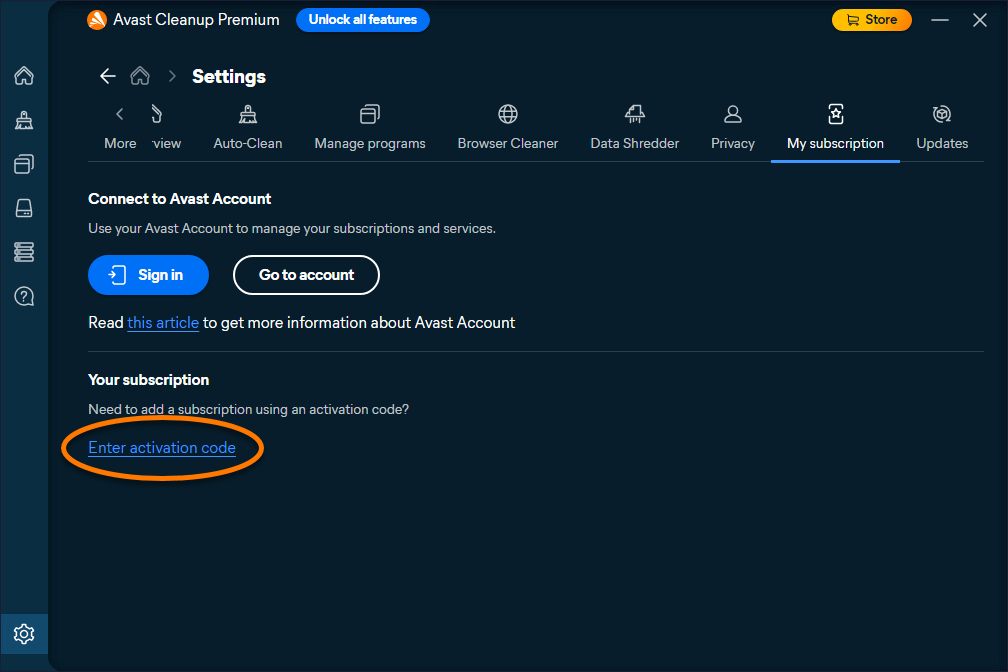
- Select Enter activation code.
- Type or paste your activation code (including hyphens) into the text box, then click Next twice.
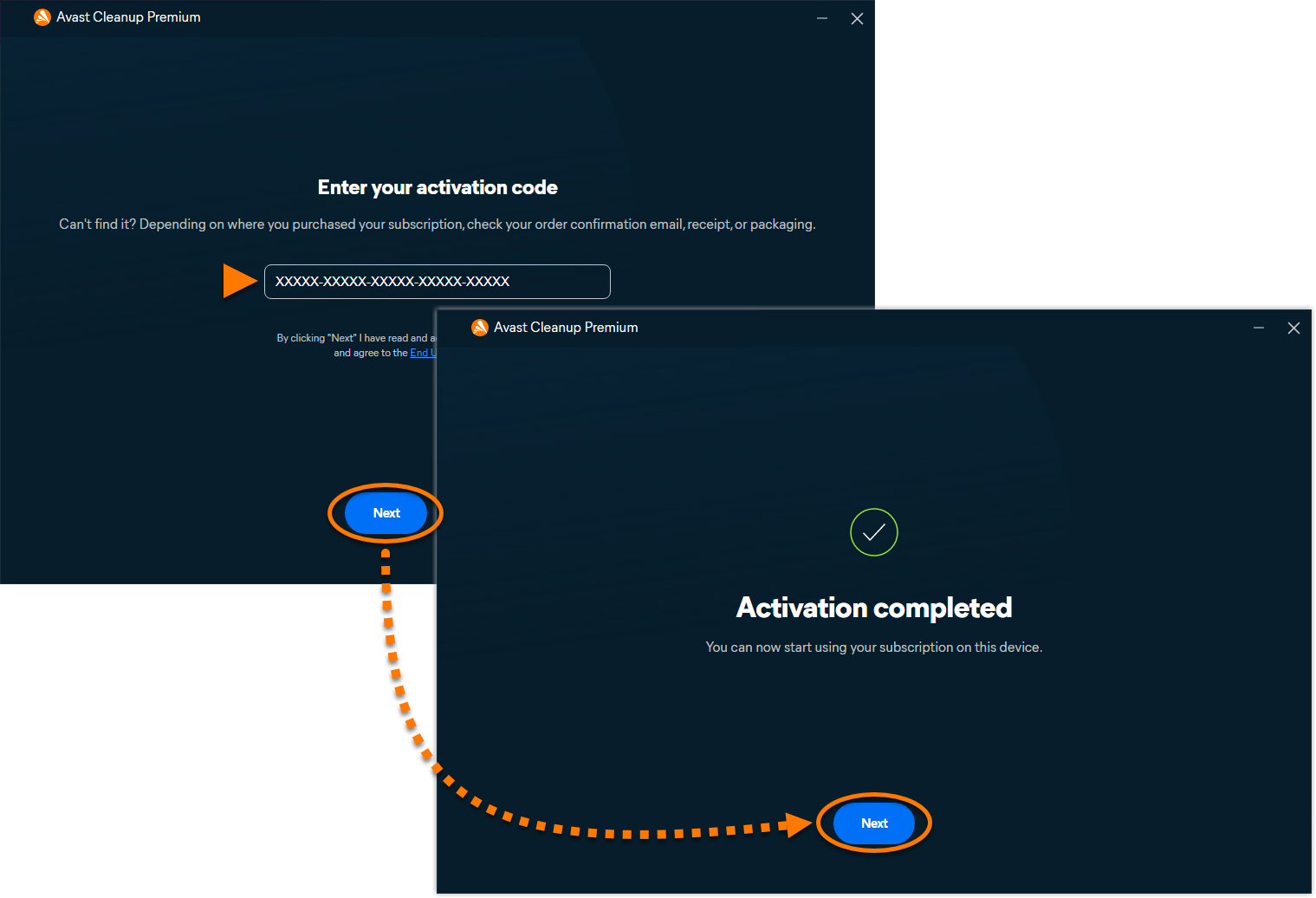
Avast Cleanup Premium is now activated. If activation is unsuccessful, refer to the Still need help? section in this article.
If you purchased Avast Cleanup Premium (Multi-Device), you can use the same activation code to activate Avast Cleanup Premium on your Windows, Mac, and Android devices.
To confirm which subscription you purchased, check your order confirmation email or the Avast Account that contains your Avast Cleanup Premium subscription.
Still need help?
To learn how to resolve some of the most common activation issues, refer to the following articles:
If the issue persists, contact Avast Support.
Further recommendations
To learn more about Avast Cleanup Premium, refer to the following articles:
To learn how to transfer your subscription to a different device, refer to the following article:
This article is about activating the standalone version of Avast Cleanup. For information about activating Avast Cleanup in the new version of Avast One, refer to the following article: Installing and Activating Avast One apps.
Avast Cleanup Premium for Mac is a paid app that requires a subscription to use. After installing Avast Cleanup Premium, you may need to manually activate your subscription by entering a valid activation code.
Enter activation code
To activate Avast Cleanup Premium using an activation code:
- Locate your activation code. This is included in your order confirmation email. For detailed instructions, refer to the following article:
- Open Avast Cleanup, then click Insert activation code on the main application screen,
 ...or click Avast Cleanup ▸ Insert activation code in the Apple menu bar.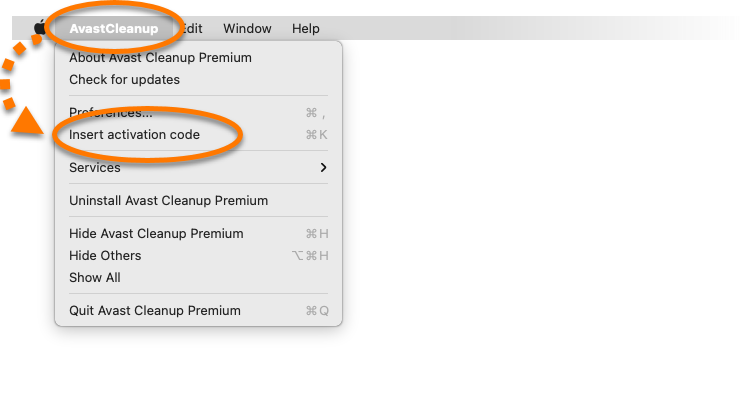
- Type or paste your activation code (including hyphens) into the text box, then click Activate.
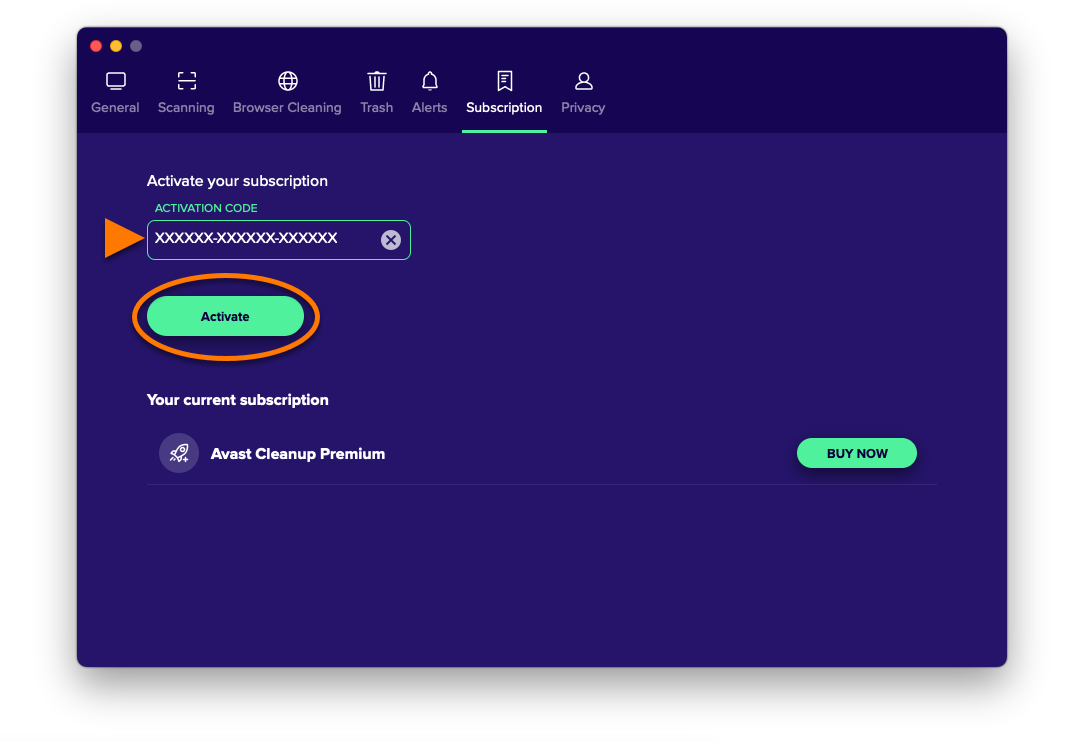
Avast Cleanup Premium is now activated. If activation is unsuccessful, refer to the Still need help? section in this article.
If you have not yet enabled Full Disk Access, refer to the following article for instructions to complete initial setup of Avast Cleanup Premium:
If you purchased Avast Cleanup Premium (Multi-Device), you can use the same activation code to activate Avast Cleanup Premium on your Mac, Windows, and Android devices.
To confirm which subscription you purchased, check your order confirmation email or the Avast Account that contains your Avast Cleanup Premium subscription.
Still need help?
To learn how to resolve some of the most common activation issues, refer to the following articles:
If the issue persists, contact Avast Support.
Further recommendations
To learn more about Avast Cleanup Premium, refer to the following articles:
To learn how to transfer your subscription to a different device, refer to the following article:
Avast Cleanup Premium for Android is available as both a free and paid app. After you install the free version of the app, you may need to activate it. A subscription purchased via Google Play Store activates automatically on the device you use to make the purchase. If you purchase your subscription through another Avast sales channel, such as the Avast Store, you need to manually activate the app using a valid activation code or your Avast Account.
Your activation options:
Activation Code
Enter activation code
To activate Avast Cleanup Premium using an activation code:
- Locate your activation code. This is included in your order confirmation email. For detailed instructions, refer to the following article:
- Open Avast Cleanup and tap Account (in the bottom navigation bar) ▸ Already have a subscription?.
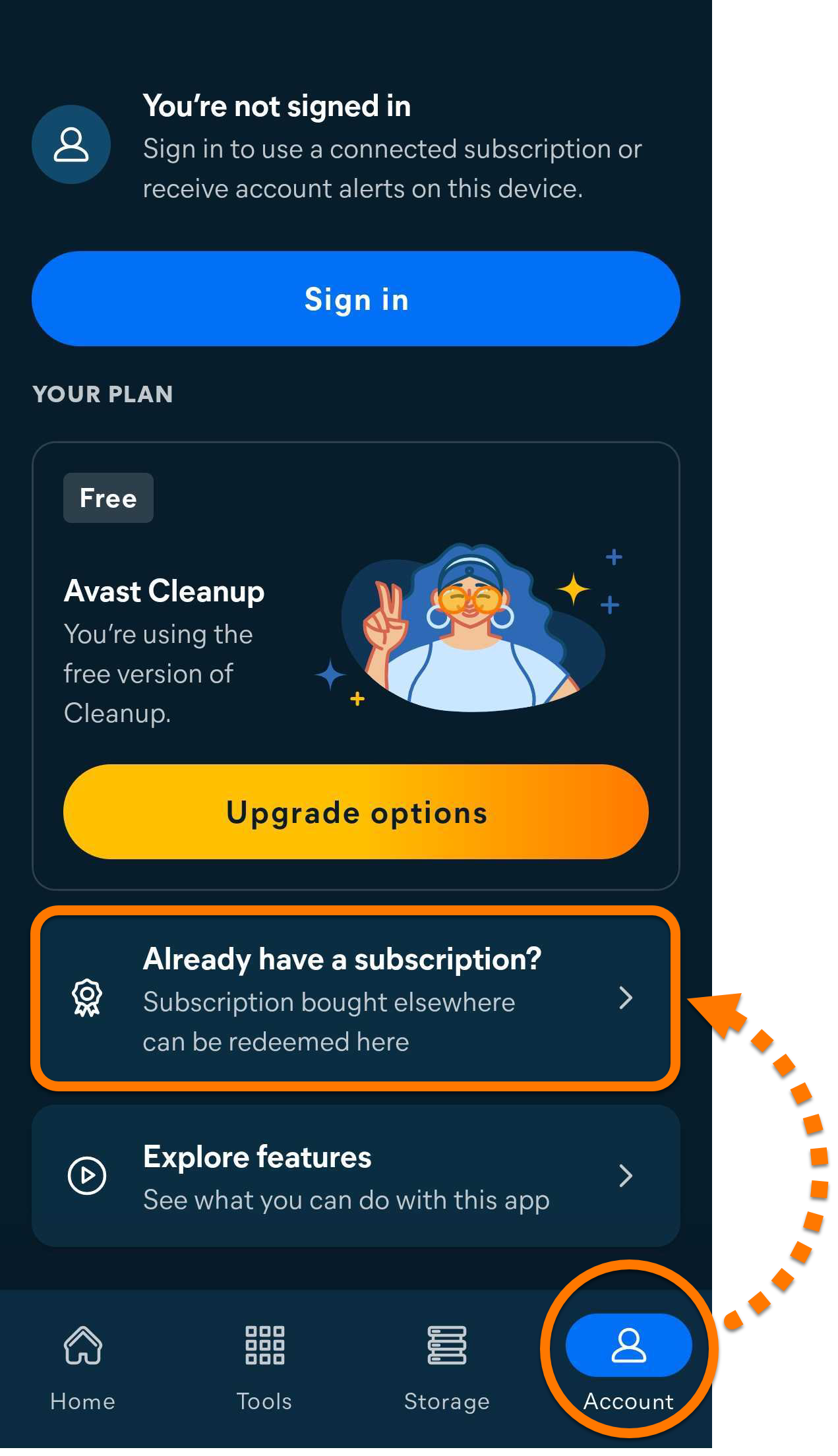
- Select Use an activation code.
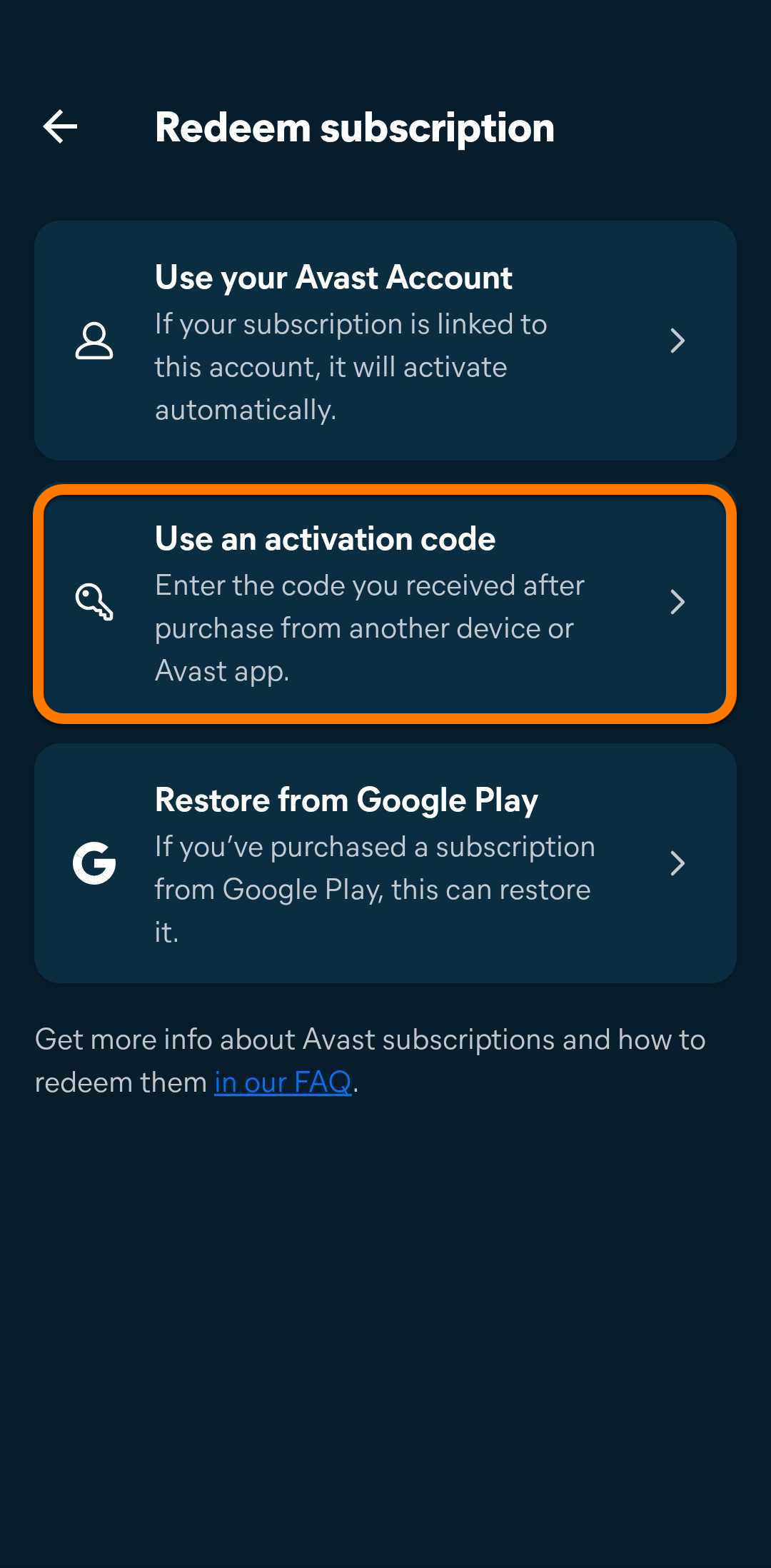
- Type or paste your activation code (including hyphens) into the text box, then tap Use this code.
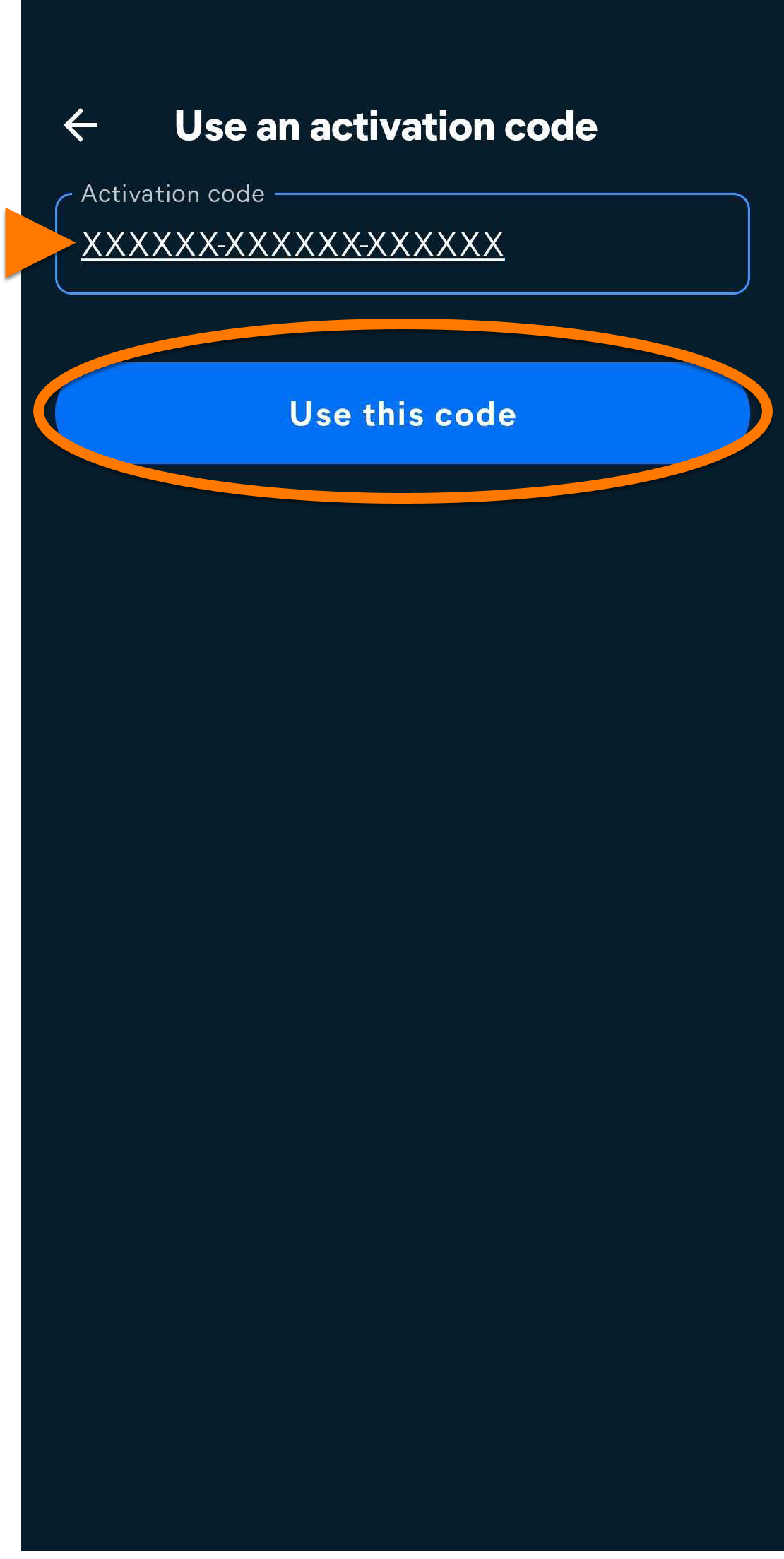
Avast Cleanup Premium is now activated. If activation is unsuccessful, refer to the Still need help? section in this article.
If you purchased Avast Cleanup Premium (Multi-Device), you can use the same activation code to activate Avast Cleanup on your Android, Windows, and Mac devices.
To confirm which subscription you purchased, check your order confirmation email or the Avast Account that contains your Avast Cleanup Premium subscription.
Avast Account
Sign in to Avast Account
An Avast Account was created using the email address that you provided during the subscription purchase. To sign into your Avast Account for the first time, refer to the following article: Activating your Avast Account.
To activate Avast Cleanup Premium using your Avast Account:
- Open Avast Cleanup and tap Account (in the bottom navigation bar) ▸ Already have a subscription?.
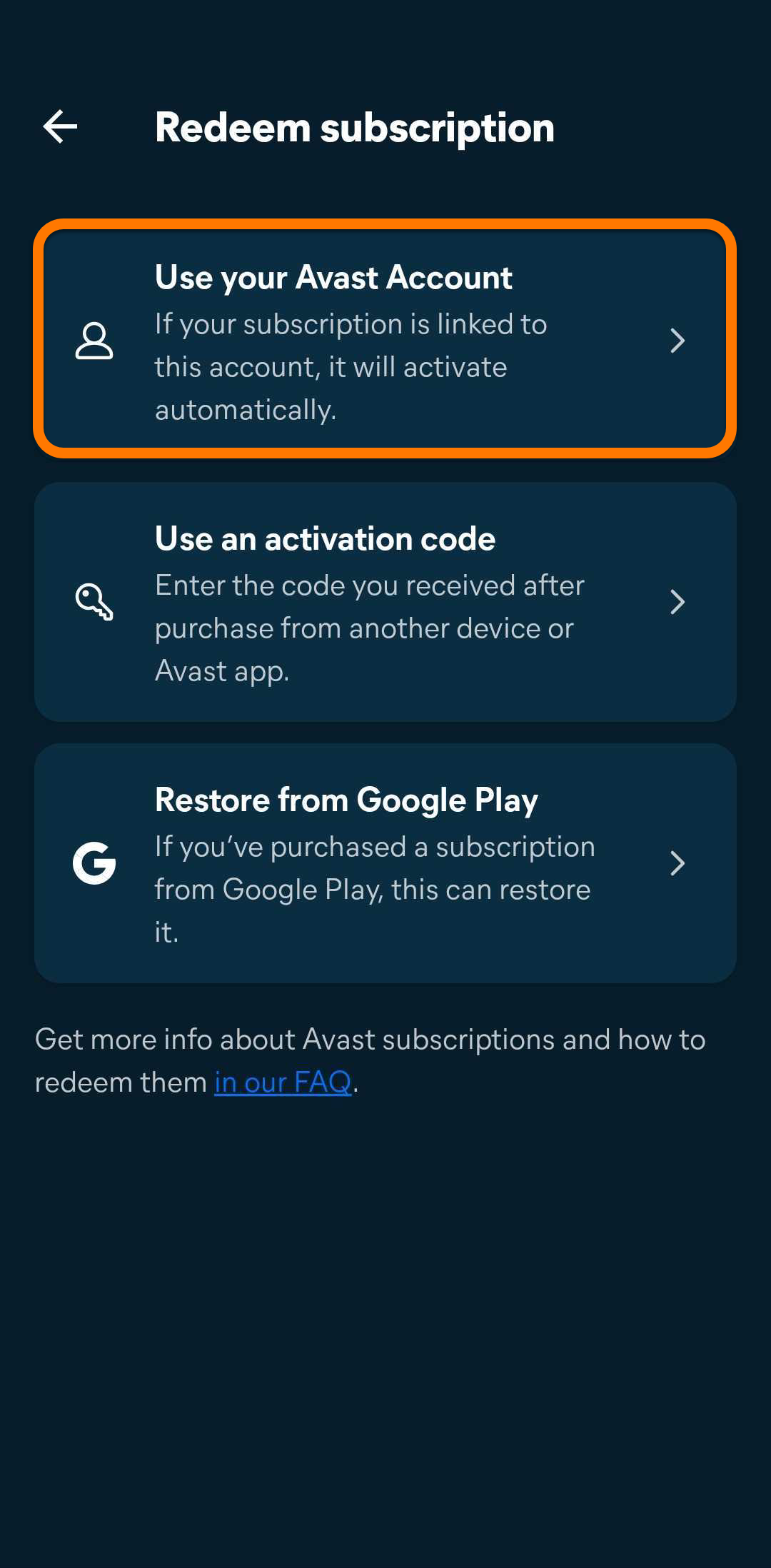
- Select Use your Avast Account.
- Enter the credentials for the Avast Account that contains your Avast Cleanup subscription, then tap Continue.
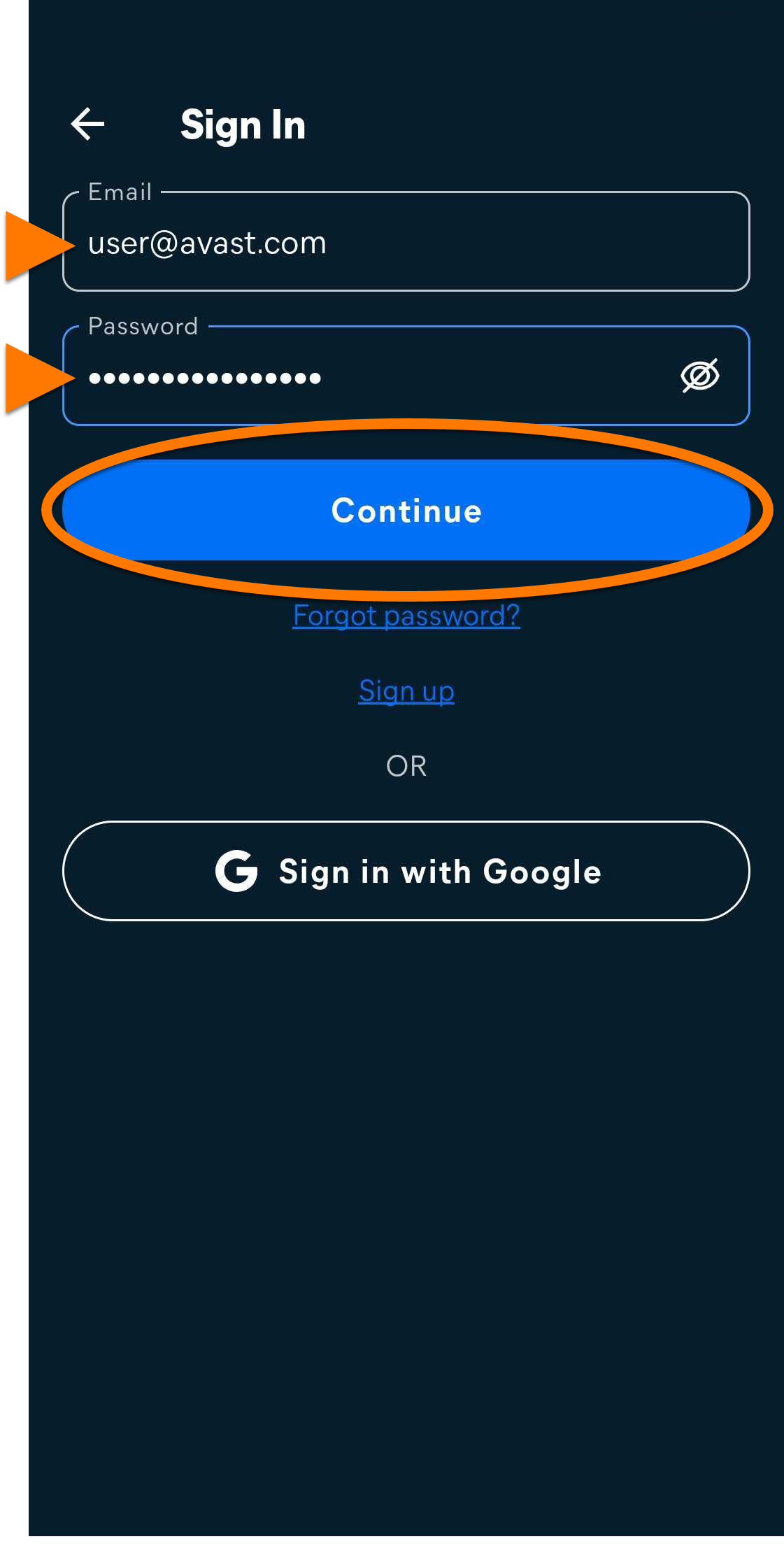
Avast Cleanup Premium is now activated. If activation is unsuccessful, refer to the Still need help? section in this article.
Google Play
Restore via Google Play
This option only applies if you purchased your Avast Cleanup subscription through Google Play Store.
If you want to start using Avast Cleanup Premium on a new device, or if you reset your existing device, you can restore your Avast Cleanup subscription via Google Play Store:
- Ensure you are signed in to Google Play Store with the same Google Account that you used to purchase Avast Cleanup. For instructions on how to verify this, refer to the following Google Play Help article: Google Play Help ▸ Add & use accounts on your device.
- Open Avast Cleanup and tap Account (in the bottom navigation bar) ▸ Already have a subscription?.
- Tap Restore from Google Play.
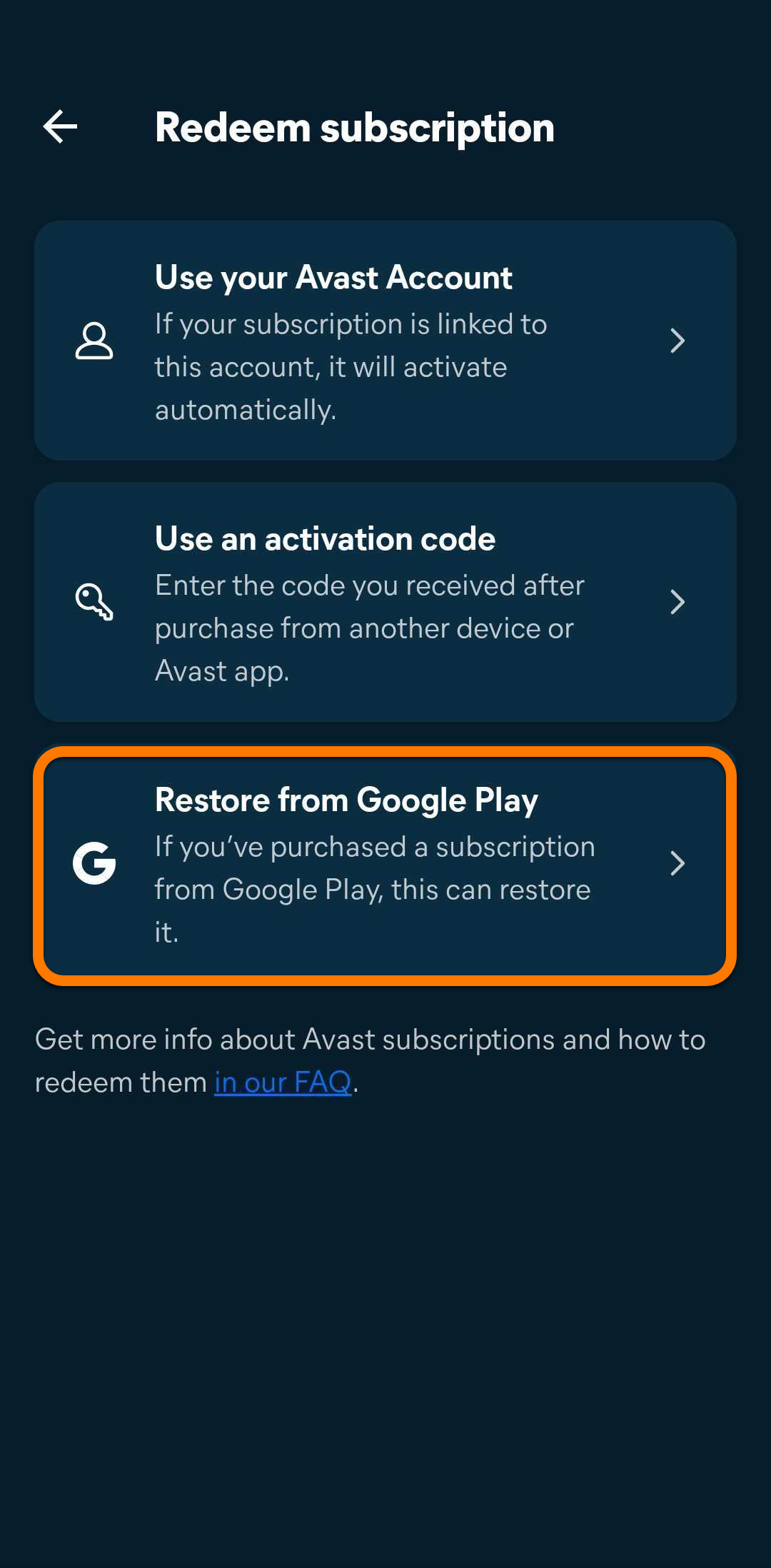
Avast Cleanup Premium is now activated. If activation is unsuccessful, refer to the Still need help? section in this article.
Still need help?
To learn how to resolve some of the most common activation issues, refer to the following articles:
If the issue persists, contact Avast Support.
Further recommendations
To learn more about Avast Cleanup Premium, refer to the following articles:
To learn how to transfer your subscription to a different device, refer to the following article:


