
IS YOUR COMPUTER SLOW? RUN LIKE NEW
If they are not maintained, computers lose performance over time. Avast Cleanup Premium can help significantly improve the performance of your computer.
Troubleshooting a PC crash or blue screen error (BSOD)
Windows
In some cases, Avast Antivirus products may conflict with third-party software installed on your PC, causing Windows to crash, freeze, or show a blue screen error (BSOD). This issue may be due to programs you run manually or services that automatically run in the background when you start Windows.
Instructions
To determine if the problem is caused by background services:
- Reboot your PC and start Windows in safe mode according to the instructions in the following article:
- When Windows is running in Safe Mode, press the
WinandRkeys on your keyboard simultaneously to open the Run dialog box.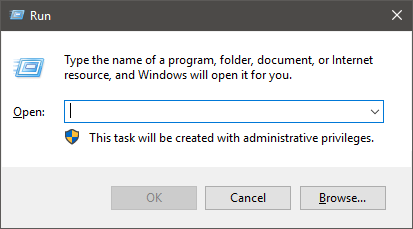
- In the Open field, type the command
msconfig.exeand click OK to open the System Configuration utility.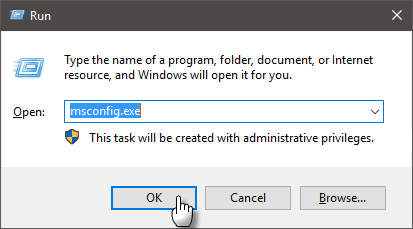
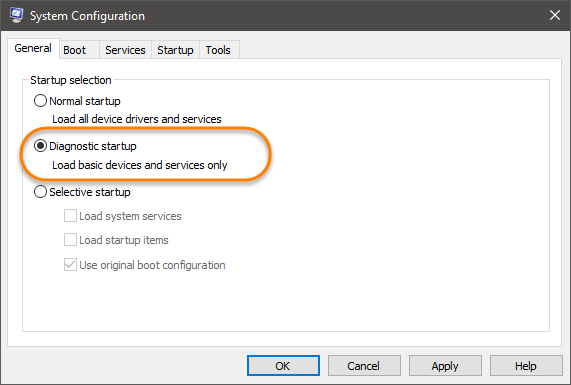
- Click the General tab and select the Diagnostic startup option to clear all startup programs.
- Click the Services tab and tick the boxes related to your Avast Antivirus services:
- Avast Premium Security: tick
Avast AntivirusandAvast Firewall. - Avast Free Antivirus: tick
Avast Antivirus.
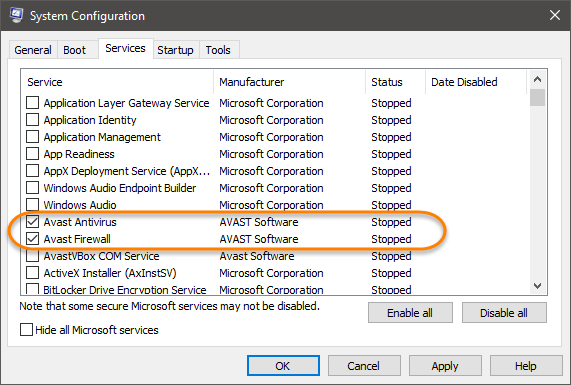
- Avast Premium Security: tick
- Return to the General tab where Selective startup is now selected, click OK and restart your PC when prompted.
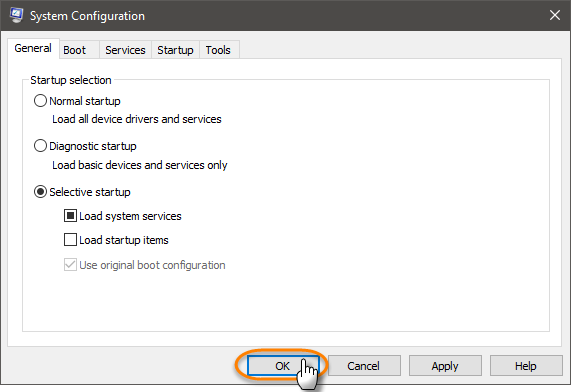
To configure Windows to restart in Normal startup mode, run the System Configuration utility and select Normal startup under the General tab.
If your PC starts working normally again, the problem is due to a conflict with another program or service running silently in the background. Report the issue to Avast Support. For more information, refer to the following article:
Was this article helpful?

Keep your online identity private!
Browse like no one’s watching with Avast anti-tracking software.