
IS YOUR COMPUTER SLOW? RUN LIKE NEW
If they are not maintained, computers lose performance over time. Avast Cleanup Premium can help significantly improve the performance of your computer.
Testing whether Avast Antivirus protects your PC against malware
Windows
Some types of malware attempt to disable your antivirus protection. To verify that Avast Antivirus is working properly on your PC, use the EICAR Anti-Malware Test File to test Avast Antivirus Web Shield and File Shield.
Testing Web Shield
Avast Antivirus Web Shield protects your system from malware while you use the internet (browsing, downloading files, etc.). If malware is detected while downloading a file from the Internet, the download is stopped to prevent the threat from reaching your PC.
- Open the EICAR website download page.
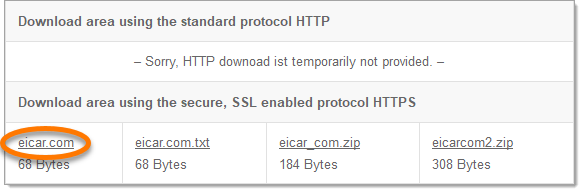
- Scroll down to the section labeled Download area using the secure, SSL enabled protocol HTTPS and click the eicar.com link to initiate the download.
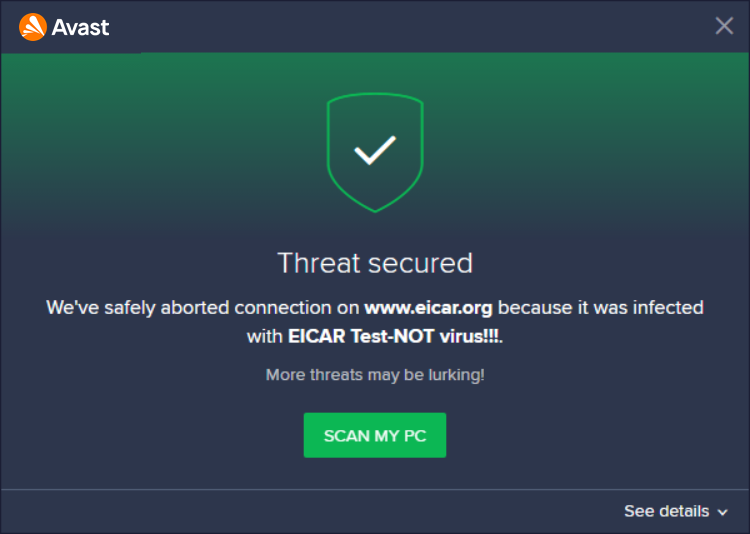
- The download site is blocked and Avast displays an alert: Threat secured, which indicates that Avast Antivirus is protecting you against malware.
Testing File Shield
The File Shield in Avast Antivirus checks any programs and files the moment they are opened, saved, or copied. If anything suspicious is detected, it stops the program from starting, or the file from being opened, saved or copied, to prevent any damage to your PC and data.
- Temporarily disable Web Shield (Stop for 10 minutes) by following the instructions in the article below:
Web Shield turns on automatically after the selected time. If the EICAR test finishes earlier, go back to
☰Menu ▸ Settings ▸ Protection ▸ Core Shields. Scroll to Web Shield and tick the box next to Enable Web Shield. - Open the EICAR website download page.
- Scroll down to the section labeled Download area using the secure, SSL enabled protocol HTTPS and click the eicar.com link to initiate the download via secured HTTPS.
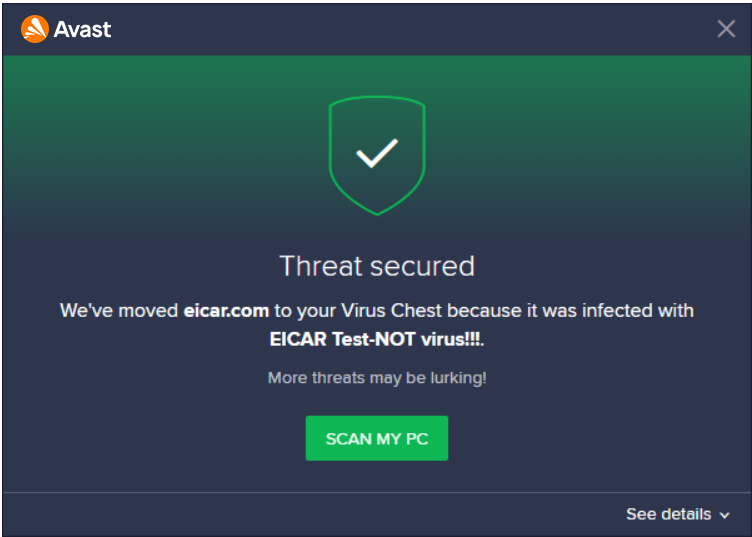
- The file download starts and Avast displays an alert: Threat secured (by default, eicar.com is moved to your Quarantine), which indicates that Avast Antivirus protects you against malware.
For more information about Avast Quarantine, refer to the following article:
Was this article helpful?

Keep your online identity private!
Browse like no one’s watching with Avast anti-tracking software.