
Avast Secure Browser is available as both a free and paid app. The paid app, Avast Secure Browser PRO, requires a subscription to use. After installing Avast Secure Browser, you may need to manually activate your application.
Your chosen activation method:
Activation code
Enter activation code
To activate Avast Secure Browser PRO using an activation code:
- Locate your activation code. This is included in your order confirmation email. For detailed instructions, refer to the article: Locating your Avast activation code.
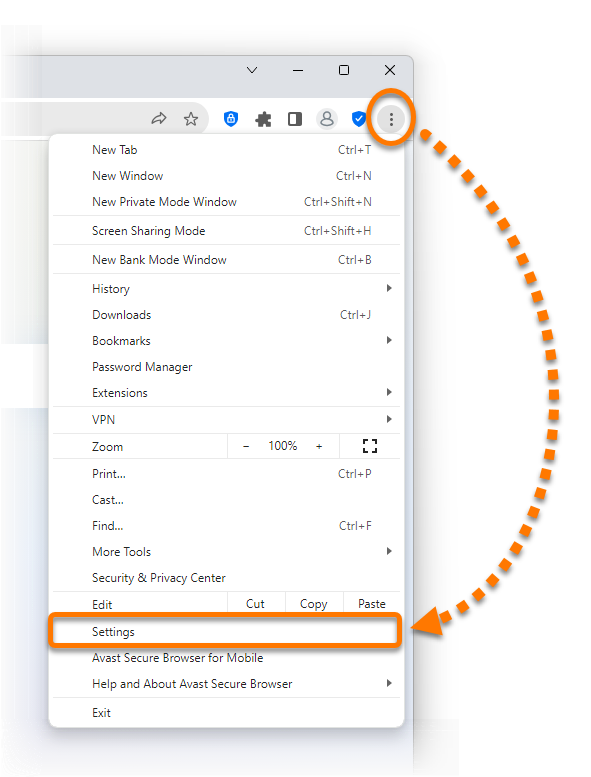
- Open Avast Secure Browser, then click
⋮Menu (the three dots) in the top-right corner of the browser window and select Settings.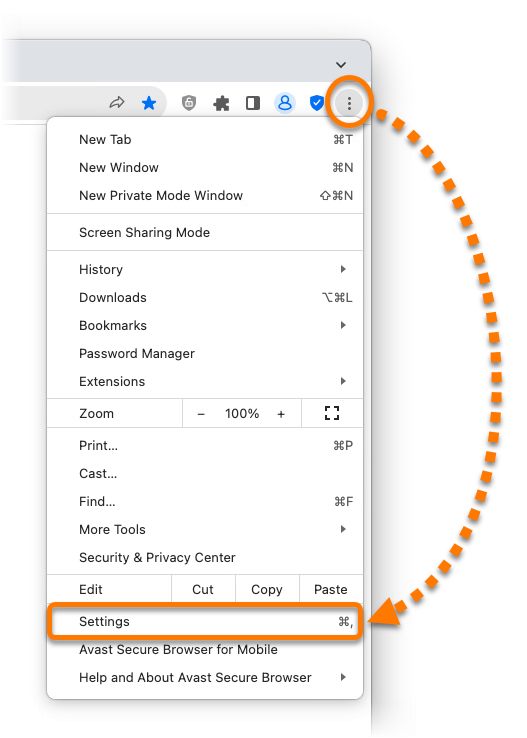
- In the left panel, select My subscriptions, then click Already have an activation code?.

- Type or paste your activation code (including hyphens) into the text box, then click Enter.

Avast account
Sign in to Avast Account
Your Avast Account login is the email address that you provided during the subscription purchase. To sign into your Avast Account for the first time, refer to the article: Activating your Avast Account.
To activate Avast Secure Browser PRO using an Avast Account:
- Open Avast Secure Browser, then click
⋮Menu (the three dots) in the top-right corner of the browser window and select Settings. - In the left panel, select My subscriptions, then click Sign in to your Avast Account.
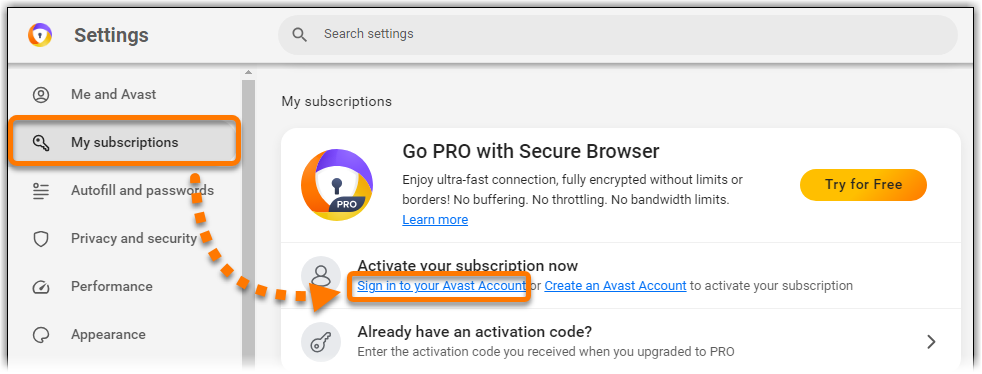
- Enter your Avast Account credentials, then click Continue.

If you experience activation issues, check that your Avast Account is registered to the email address you used to purchase Avast Secure Browser PRO. If you used a different email address for purchase, you can add this email address to your Avast Account. For detailed instructions, refer to the article: Adding a missing subscription to your Avast Account.
Avast Secure Browser PRO is activated. If activation is unsuccessful, refer to the Troubleshoot activation issues section of this article.
Troubleshoot activation issues
To learn how to resolve some of the most common activation issues, refer to the following articles:
Further recommendations
To learn more about Avast Secure Browser, refer to the following articles:

 Account icon in the top-left corner of the screen.


 Account icon in the top-left corner of the screen.


