
Promotional banner image

IS YOUR COMPUTER SLOW? RUN LIKE NEW

If they are not maintained, computers lose performance over time. Avast Cleanup Premium can help significantly improve the performance of your computer.

Troubleshooting installation errors caused by corrupted setup files

If you see the Package Broken or Not a Valid Win32 Application error when trying to run the installation file of an Avast product on your Windows PC, the setup file may be corrupted or incomplete. To fix this issue, follow the steps in this article.

Download your Avast product again

Click one of the following links to download your preferred Avast product:

Avast Antivirus products for Windows

Other Avast products for Windows

Ensure the setup file is whole and uncorrupted

If the error continues to appear, check the integrity of the setup file you downloaded:

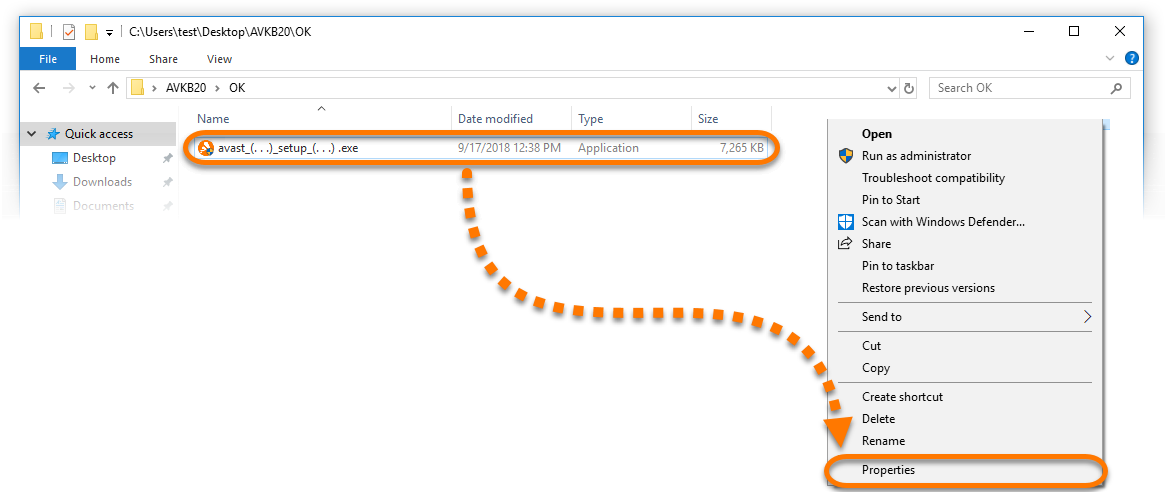
  1. Go to the folder where you saved the avast_(...)_setup_(...).exe setup file (by default, all files are saved to your Downloads folder). The file name includes the name of your Avast product and either online or offline, for example avast_premium_security_setup_offline.exe.  

  2. Right-click avast_(...)_setup_(...).exe and select Properties.  

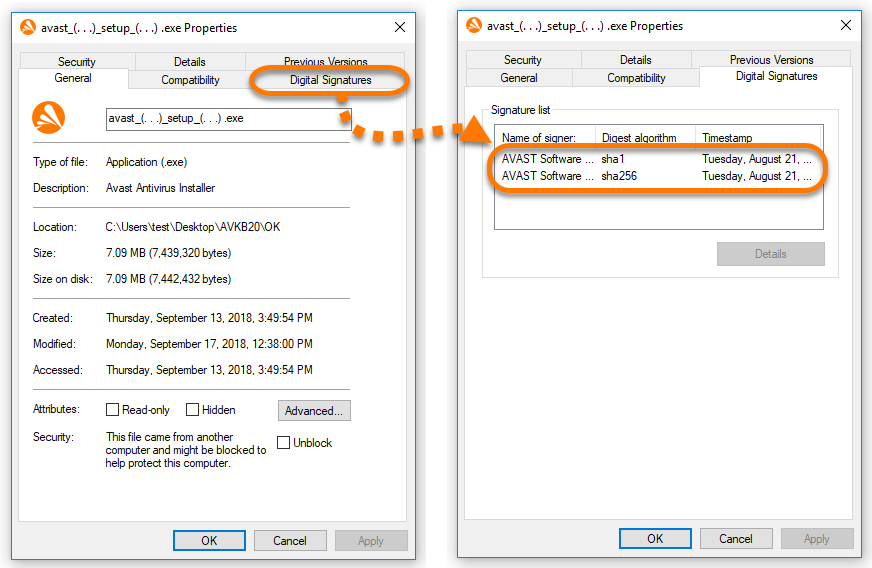
  3. Select the Digital Signatures tab. You should see 1 or 2 digital signatures from AVAST Software s.r.o..  

    If you don't see the Digital Signatures tab, your setup file is incomplete or corrupted. Troubleshoot this issue by using the instructions in the I have no Digital Signatures tab section of this article.

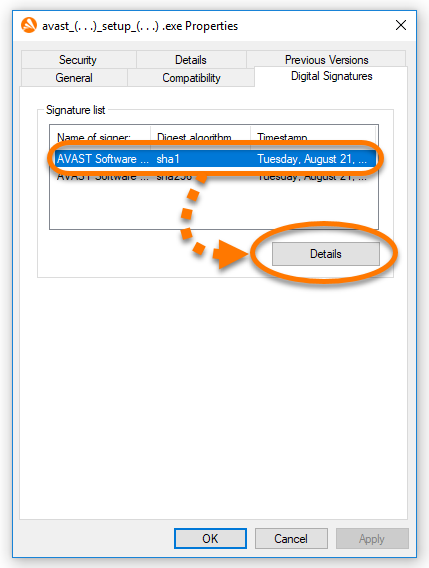
  4. Click a digital signature to select it, then click Details.  

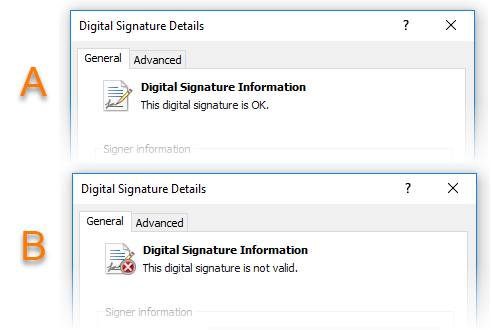
  5. Locate the message displayed below Digital Signature Information. Depending on which message you see, refer to the relevant instructions below.  


Digital signature status:

If you see the message This digital signature is not valid in one or both digital signatures, your setup file is incomplete or corrupted. Try the following solutions:

  1. Download your Avast setup file on a different PC (using the relevant link from this article), then transfer the file to your original PC using a USB or portable hard drive.

  2. Refer to the relevant article below and ensure to follow the installation steps exactly:

  3. If you continue to experience issues downloading the Avast setup file, contact Avast Support.

If you see the message This digital signature is OK in all digital signatures, your setup file is whole and uncorrupted. In this case, there is another reason why the setup file failed to download. Try the following solutions:

  1. Close all other applications and antivirus software that may be running in the background, then download the file again using the relevant link from this article.

  2. Refer to the relevant article below and ensure to follow the installation steps exactly:

  3. If you continue to experience issues downloading the Avast setup file, contact Avast Support.

If you don't see the Digital Signatures tab in the Properties menu, your setup file is incomplete or corrupted. Try the following solutions:

  1. Download your Avast setup file on a different PC (using the relevant link from this article), then transfer the file to your original PC using a USB or portable hard drive.

  2. Refer to the relevant article below and ensure to follow the installation steps exactly:

  3. If you continue to experience issues downloading the Avast setup file, contact Avast Support.

DocID: troubleshoot-antivirus-corrupted-setupLast modified: 07/28/2026

Was this article helpful?

Promotional banner image

Keep your online identity private!

Browse like no one’s watching with Avast anti-tracking software.

Need more help?

Contact us
Avast account
Visit our forums
Visit academy