
Before following the instructions below, ensure that you have the latest version of your browser installed:
If the issue persists after updating your browser, follow these steps:
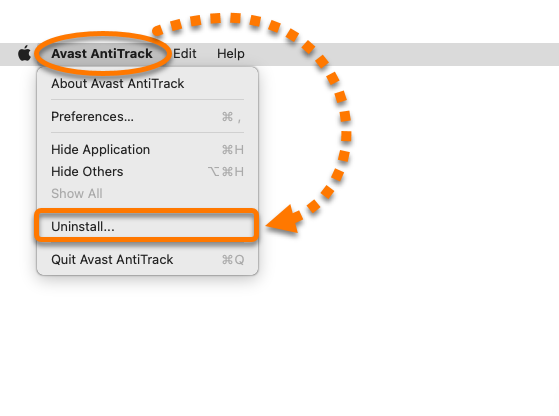
- Open Avast AntiTrack, then click Avast AntiTrack in the Apple menu bar and select Uninstall....
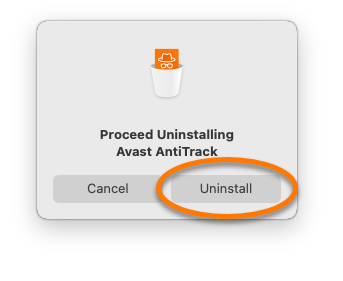
- When the Avast AntiTrack Uninstaller window appears, click Uninstall.
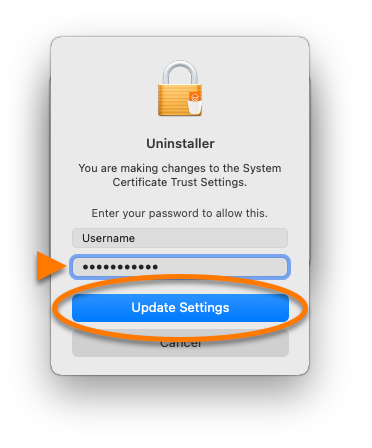
- If prompted, enter the password that you use when you start your Mac, then click Update Settings.
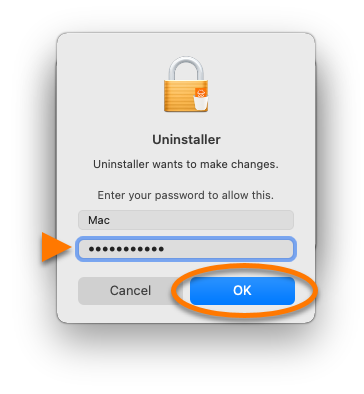
- Enter the password that you use when you start your Mac, then click OK.
- Restart your Mac.
- Reinstall Avast AntiTrack by following the steps in this article:
