Promotional banner image

IS YOUR COMPUTER SLOW? RUN LIKE NEW

If they are not maintained, computers lose performance over time. Avast Cleanup Premium can help significantly improve the performance of your computer.

Troubleshooting when Avast AntiTrack cannot detect tracking activity

Windows, Mac

Avast AntiTrack is a privacy application designed to keep your identity safe from the latest online tracking techniques.

In rare cases, Avast AntiTrack may fail to detect and block tracking attempts. If you experience this issue, follow the instructions below to resolve this situation.

Instructions

First, ensure the Avast AntiTrack browser extension is enabled in your browser. For detailed instructions, refer to: Installing the Avast AntiTrack browser extensions.

Next, ensure your browser is up to date. For instructions, refer to the following articles: Google Chrome | Mozilla Firefox | Microsoft Edge.

If the issue persists after you have confirmed that the extension is enabled and your browser is up to date, reinstall Avast AntiTrack by following the steps below:

  1. Uninstall Avast AntiTrack by following the instructions in this article:
  2. Restart your Windows device.
  3. Reinstall Avast AntiTrack by following the instructions in this article:

Before following the instructions below, ensure that you have the latest version of your browser installed:

If the issue persists after updating your browser, follow these steps:

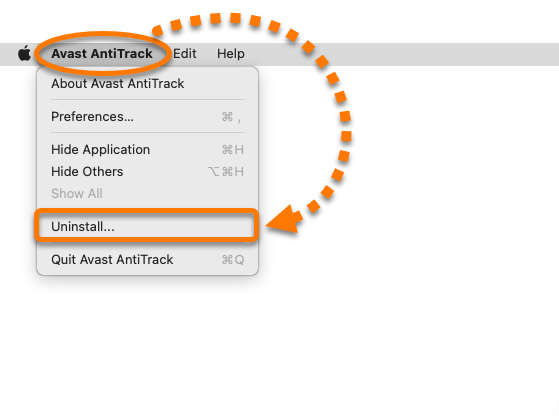
  1. Open Avast AntiTrack, then click Avast AntiTrack in the Apple menu bar and select Uninstall....
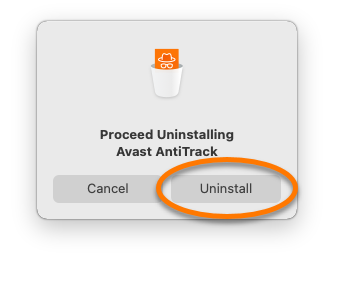
  2. When the Avast AntiTrack Uninstaller window appears, click Uninstall.
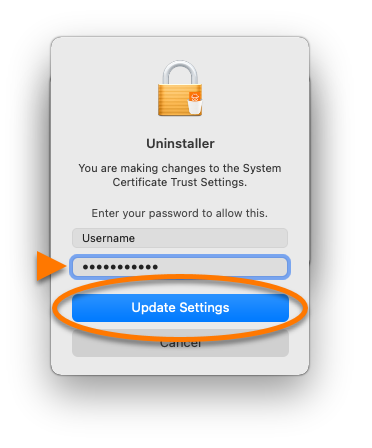
  3. If prompted, enter the password that you use when you start your Mac, then click Update Settings.
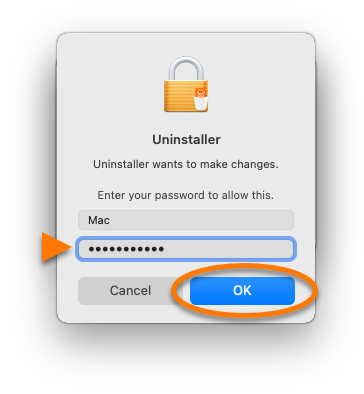
  4. Enter the password that you use when you start your Mac, then click OK.
  5. Restart your Mac.
  6. Reinstall Avast AntiTrack by following the steps in this article:

DocID: troubleshoot-antitrack-failureLast modified: 10/09/2026

Was this article helpful?

Promotional banner image

Keep your online identity private!

Browse like no one’s watching with Avast anti-tracking software.

Need more help?

Contact us
Avast account
Visit our forums
Visit academy