
- Open Avast Premium Security and go to
☰Menu ▸ Enter activation code.
- Type or paste your activation code into the text box (including hyphens), then click Enter.

IS YOUR COMPUTER SLOW? RUN LIKE NEW
If they are not maintained, computers lose performance over time. Avast Cleanup Premium can help significantly improve the performance of your computer.
Troubleshooting when an Avast application no longer recognizes your paid subscription
Windows
This article contains instructions for when an Avast application on your Windows PC no longer recognizes your paid subscription.
When this issue occurs in Avast Premium Security, you see the status Your subscription is not valid on the main application screen. In other Avast applications, such as Avast Cleanup Premium, you may lose access to paid product features.
To resolve this issue, refer to the instructions in the relevant section below according to your product:
Avast Premium Security
We recommend reactivating your subscription by either entering a valid activation code, or by signing in to Avast Premium Security with your Avast Account that is linked to the email address you provided during the subscription purchase.
Your activation options:
- Open Avast Premium Security and go to
☰Menu ▸ My Subscriptions.
- If you are already signed in with an Avast Account, click Sign Out.

- Click Sign in to Avast Account.

- Enter your Avast Account credentials, then click Sign In.
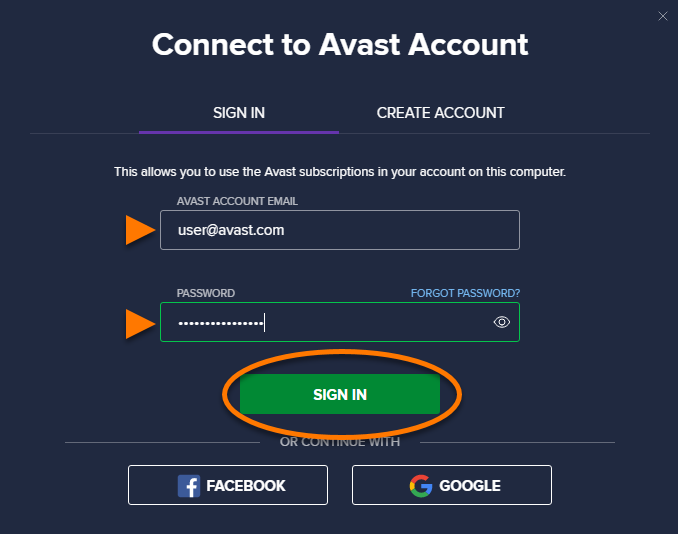
Your Avast Premium Security subscription is now active, and the main application screen should report the status You are fully protected.
If these steps do not resolve the issue, contact Avast Support.
Avast Cleanup Premium
We recommend reactivating your subscription by either entering a valid activation code, or by signing in to Avast Cleanup Premium with your Avast Account that is linked to the email address you provided during the subscription purchase.
Your activation options:
- Open Avast Cleanup Premium and go to
☰Menu ▸ My licenses.
- If you are already signed in with an Avast Account, click Sign Out.

- Click Sign in to your Avast Account.

- Enter your Avast Account credentials, then click Sign In.

- Open Avast Cleanup Premium and go to
☰Menu ▸ My licenses. - Click Enter a valid activation code.

- Type or paste your activation code into the text box (including hyphens), then click Enter.

Your Avast Cleanup Premium subscription is now active, and you should have access to the paid product features.
If these steps do not resolve the issue, contact Avast Support.
Other Avast products
We recommend reactivating your subscription by either entering a valid activation code, or by signing in to the application with your Avast Account that is linked to the email address you provided during the subscription purchase.
For detailed reactivation instructions, refer to the relevant article below according to your product:
- Avast SecureLine VPN | Avast Driver Updater | Avast AntiTrack | Avast BreachGuard | Avast Battery Saver
After you have reactivated your subscription, the application should recognize your subscription and you should have access to the paid product features.
If this information does not resolve the issue, contact Avast Support.
DocID: troubleshoot-invalid-subscriptionLast modified: 09/03/2026
Was this article helpful?

Keep your online identity private!
Browse like no one’s watching with Avast anti-tracking software.
Need more help?
Contact us
Avast account
Visit our forums
Visit academy