
IS YOUR COMPUTER SLOW? RUN LIKE NEW
If they are not maintained, computers lose performance over time. Avast Cleanup Premium can help significantly improve the performance of your computer.
Activating Avast Free Antivirus
Windows
After installing Avast Free Antivirus, the application automatically activates. However, after 12 months, the application may prompt you to activate it again. To continue using Avast Free Antivirus, follow the activation steps in this article.
Activate Avast Free Antivirus
- Right-click the
 Avast icon in the notification area of your Windows taskbar and select Registration information.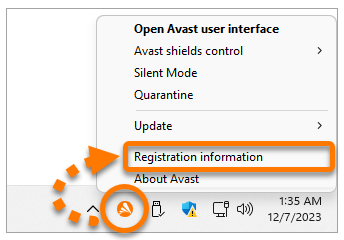
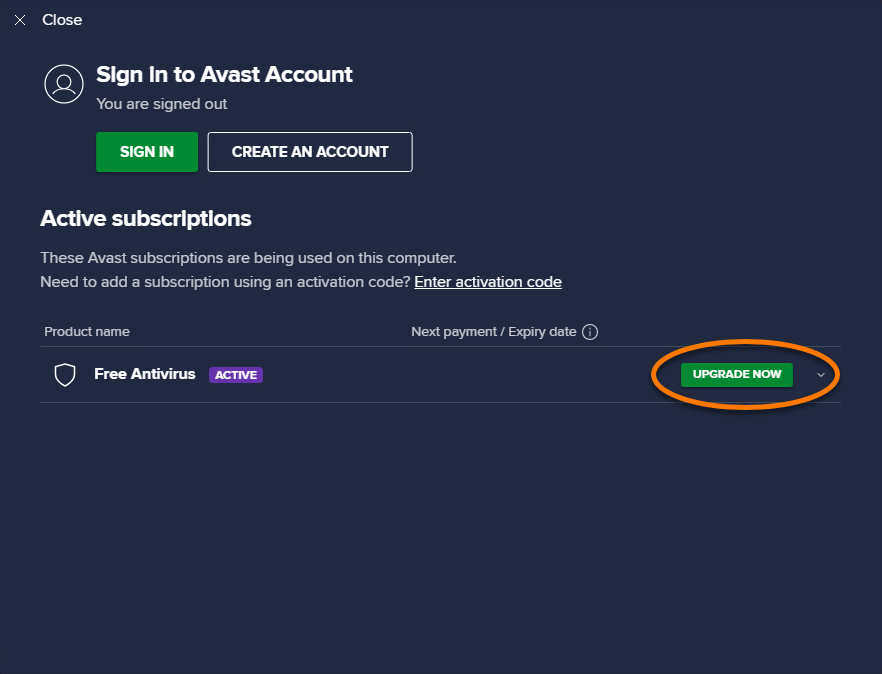
- In the My subscriptions panel, click Upgrade now next to Avast Free Antivirus.
- Click Select in the Avast Free Antivirus column.

If the Select button is missing, Avast Free Antivirus is already activated on your Windows PC.
Avast Free Antivirus is now activated for one year. After 12 months you can renew the activation again by following the steps above.
DocID: activate-free-antivirusLast modified: 09/03/2026
Was this article helpful?

Keep your online identity private!
Browse like no one’s watching with Avast anti-tracking software.
Need more help?
Contact us
Avast account
Visit our forums
Visit academy