
IS YOUR COMPUTER SLOW? RUN LIKE NEW
If they are not maintained, computers lose performance over time. Avast Cleanup Premium can help significantly improve the performance of your computer.
Enabling Avast security apps in your Login Items on macOS Ventura 13.x and later
Mac
The Login Items feature on your macOS (Ventura and later) helps you manage the apps that open automatically when you start up or log in to your Mac. By default, your Avast security apps (Avast Premium Security or Avast One) are added to the Login Items list. Make sure that you do not disable Avast from the Login Items list since Avast checks and installs critical software updates in the background to help ensure real-time protection.
You receive an alert to turn on Login Items for Avast in the System Settings in any one of the following cases:
- If your Avast app is already opened in the background when you disable Avast from your Login Items.
- If you launch your Avast app after disabling Avast from your Login Items.
To continue using all Avast features and help protect your Mac from security risks you must enable Avast in your Login Items. Follow the steps below to enable and reactivate your Avast protection.
- Click the System Settings icon in the dock.

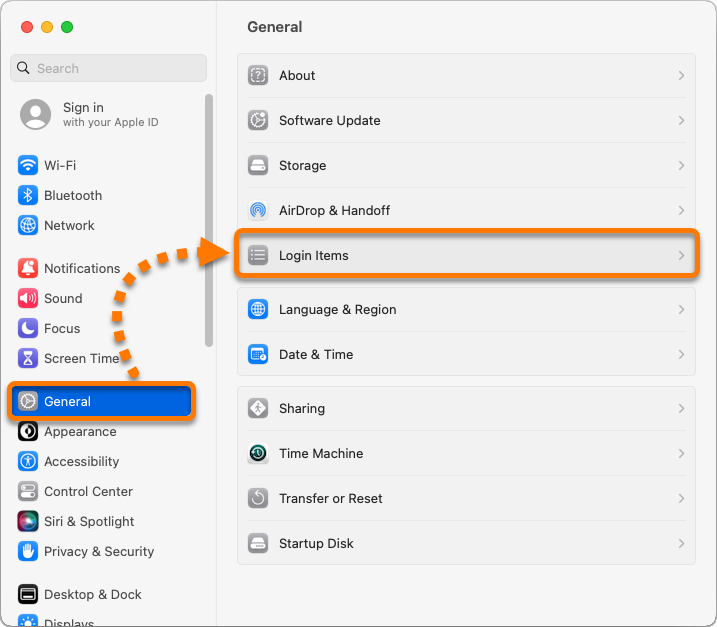
- Click General ▸ Login Items.
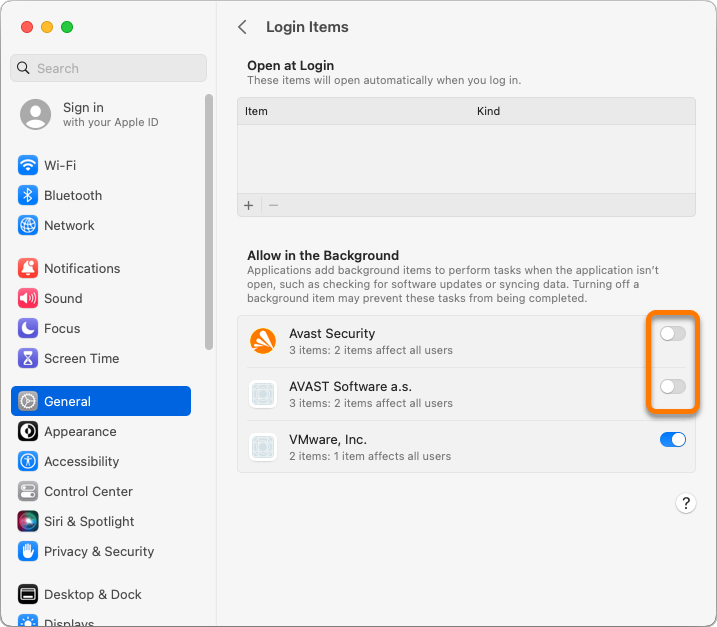
- Under Allow in the Background, click the slider next to the Avast items to enable Avast to run automatically after you log in to your Mac.
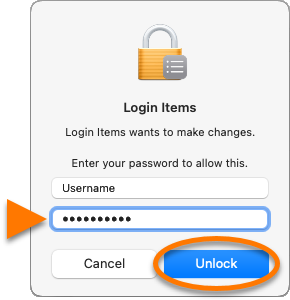
- If prompted, enter the password that you use when you start your Mac, and click Unlock.
Your Avast app is now enabled in Login Items.
In some cases, you may encounter issues with your Avast scans or Avast app notifications after you disable and enable Avast in your Login Items. To resolve this problem, exit all the open applications and restart your Mac.
Was this article helpful?

Keep your online identity private!
Browse like no one’s watching with Avast anti-tracking software.