
IS YOUR COMPUTER SLOW? RUN LIKE NEW
If they are not maintained, computers lose performance over time. Avast Cleanup Premium can help significantly improve the performance of your computer.
Sending log reports to Avast Support in Avast VPN
Android
Avast VPN allows you to send log reports from the app, through your email provider. Providing Avast Support with your log reports allows them to better understand the technical issues you are experiencing.
Instructions
To send log reports to Avast Support:
- Open Avast VPN and go to
 Settings ▸ About.
- Tap Current version seven times.

- Tap
 (the back arrow) ▸ Log.
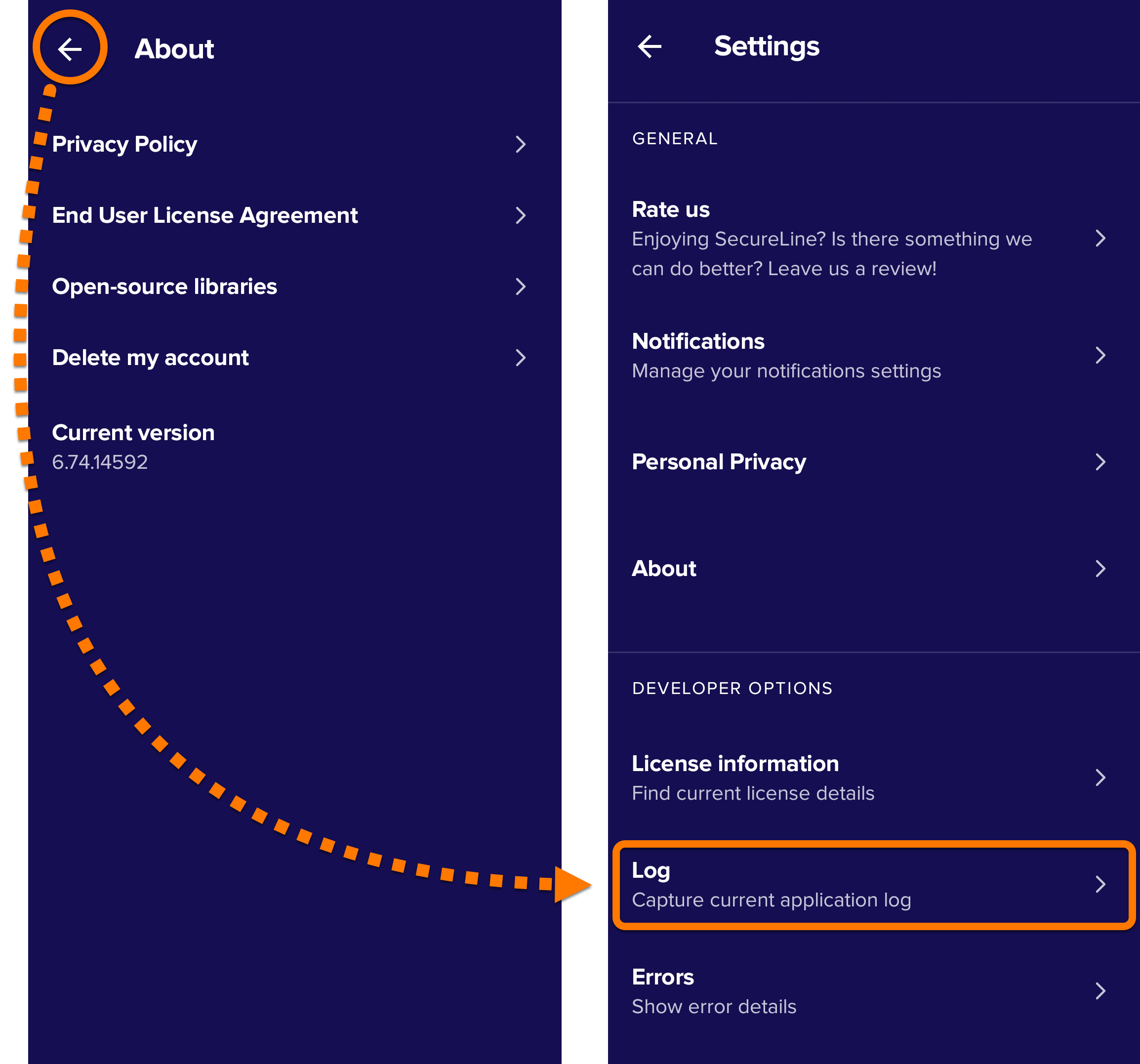
- Select Capture to copy the log report. The log report is copied to your clipboard.

- Navigate to the email correspondence you have open with the Avast support agent.
- Paste the log report from your clipboard to the email, and send it to the Avast support agent.
The log reports are sent.
DocID: send-log-reports-avast-vpnLast modified: 11/16/2026
Was this article helpful?

Keep your online identity private!
Browse like no one’s watching with Avast anti-tracking software.
Need more help?
Contact us
Avast account
Visit our forums
Visit academy